
No. Claude does not generate photos or illustrations on its own. It can draw diagrams, charts and icons as SVG, write a prompt for another image tool, or run an image model that you connect to it. This guide covers all three, with requests you can copy.
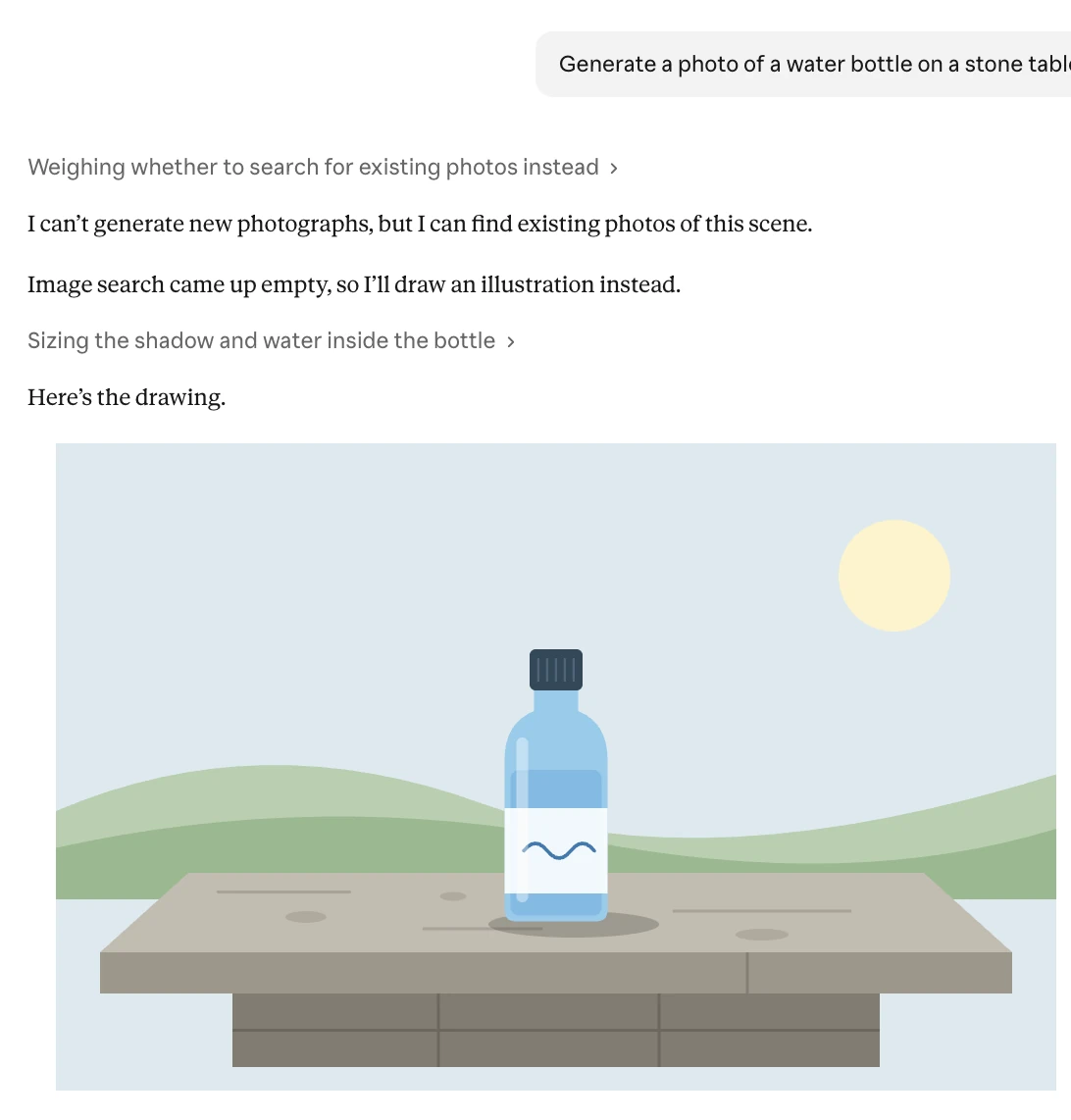
We asked it anyway. On the Free plan, with no image tool connected, we sent "Generate a photo of a water bottle on a stone table." Claude said it cannot generate new photographs, searched for an existing one, found nothing and drew this instead. It told us clearly that the drawing was not a photo.
With an image model connected, Claude returned product photos for 2 to 12 cents each. You can go straight to the test or to the setup.
Anthropic's own pages say the same about Claude alone. The Claude help center explains that Claude does not make photos or illustrations the way image tools do. Its built-in visuals use HTML and SVG and are in beta on Claude web and desktop. The developer documentation describes a model that understands images but does not create or edit them. We checked both on November 23, 2026.
Claude image generation: what works and what does not
| You need | Claude alone | Claude with a connected image model |
|---|---|---|
| Photo of a product, person or place | No | Yes, the connected model makes it |
| Painted or detailed illustration | No | Yes, the connected model makes it |
| Edit to a photo you upload | No, it can only describe the photo | Yes, if that model supports editing |
| Diagram, chart or flowchart | Yes, as HTML or SVG | Not needed |
| Simple icon or flat drawing | Yes, as SVG | Optional |
| Review of an image against your brief | Yes, it reads uploaded images | Yes |
| Proof that an image is AI-made | No | No |
The last row is easy to miss. Anthropic warns that Claude cannot determine whether an image is AI-generated, so do not use it as a detector.
Choose the way that fits your task
| Way | Best for | What you need | Main limit |
|---|---|---|---|
| 1. SVG or diagram in Claude | Process charts, icons, explainer graphics | Only Claude | Looks drawn, not photographed |
| 2. Claude writes the prompt | One picture in a tool you already use | Claude and any image tool | You copy text between two windows |
| 3. Connected image model | Product images, ad concepts, several versions | Claude, an MCP server and an account there | You set it up once and pay for images separately |
If you need one photo and already have an image tool, use way 2. If you make images regularly, way 3 saves the copying.
Way 1: ask Claude for an SVG or a diagram
Choose this way for icons, flowcharts and simple graphics. An SVG stays sharp at any size and is easy to recolor. Say what the graphic must show, which colors it may use and what to leave out.
Draw a flat SVG icon of a reusable water bottle. Use three colors: sage green, steel grey and white. No text, no gradients, no background. Keep every shape separate so I can recolor it.
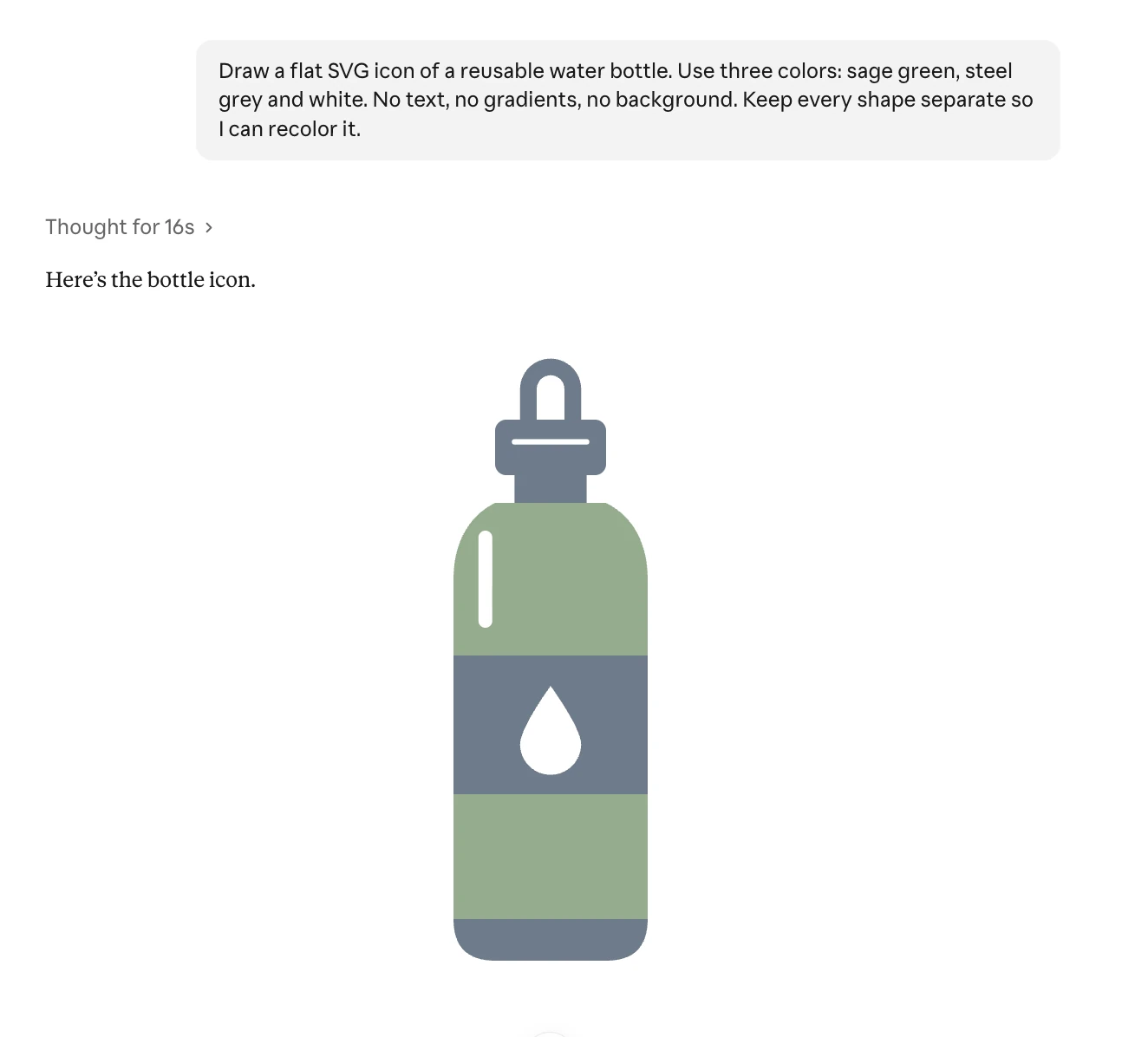
Claude kept the three colors and gave every shape its own name, so each one can be recolored. It also added a water drop, a label band and a carry loop that nobody asked for. If you need a plain shape, list the parts it may contain.
Before you use the file, open it in a browser and zoom in. Check that no shapes overlap by accident and that small parts are still readable at the size you need.
Way 2: let Claude write the image prompt
Choose this way if you already have an image tool and need a better prompt for it. Ask Claude for one prompt and for the details to check afterwards. Put your product in the brackets.
Write one image prompt for [product]. It must state: where the image will be used, the subject and the details that must stay exact, the position of the subject, the direction of light, the background, the exact text on the product, what must not appear, and the aspect ratio. Return the prompt first. Then list three details I should check in the result.
Read the answer before you paste it. Claude filled in every choice we had left open: it centered the bottle, set the format to 4:5 and gave the bottle a lid in the same green. It also wrote one line that makes no sense as an instruction, "slightly right-of-center is not allowed". Replace whatever does not match your plan.
Here is the prompt we used for the test below. OLVEN is a made-up brand.
Square product photo of one matte sage-green reusable water bottle with a steel screw cap. The bottle stands upright in the left third of the frame on a pale stone surface. Soft daylight comes from the left and casts a short shadow to the right. Plain warm-grey background. The right half stays empty for text. The bottle has one word printed on it in white capital letters: OLVEN. No other text, no logo, no hands, no props.
If the result misses the brief, describe what you see. Write "the bottle is in the center, move it to the left third" instead of "make it better". Our guide to writing a creative brief for AI images covers this step in detail.
Way 3: connect an image model to Claude
Choose this way if you make images often. You ask in the chat, the image model does the work, and the pictures come back to the same chat. You do not need to write code.
Claude reaches the image model through a custom connector, which is the address of an MCP server. MCP (Model Context Protocol) is the standard Claude uses to work with other services. Custom connectors are available on every Claude plan, Free included. The Free plan allows one. On Team and Enterprise plans an Owner adds it for the organization.
Several services run an image generation MCP server. Hugging Face has a guide for its own models. The steps below use Nova Creative, our product, because it sends one brief to several image models. We followed them in a browser on the Free plan.
Add the connector
- In Claude, open Plugins in the left menu. The documentation also calls this page Connectors.
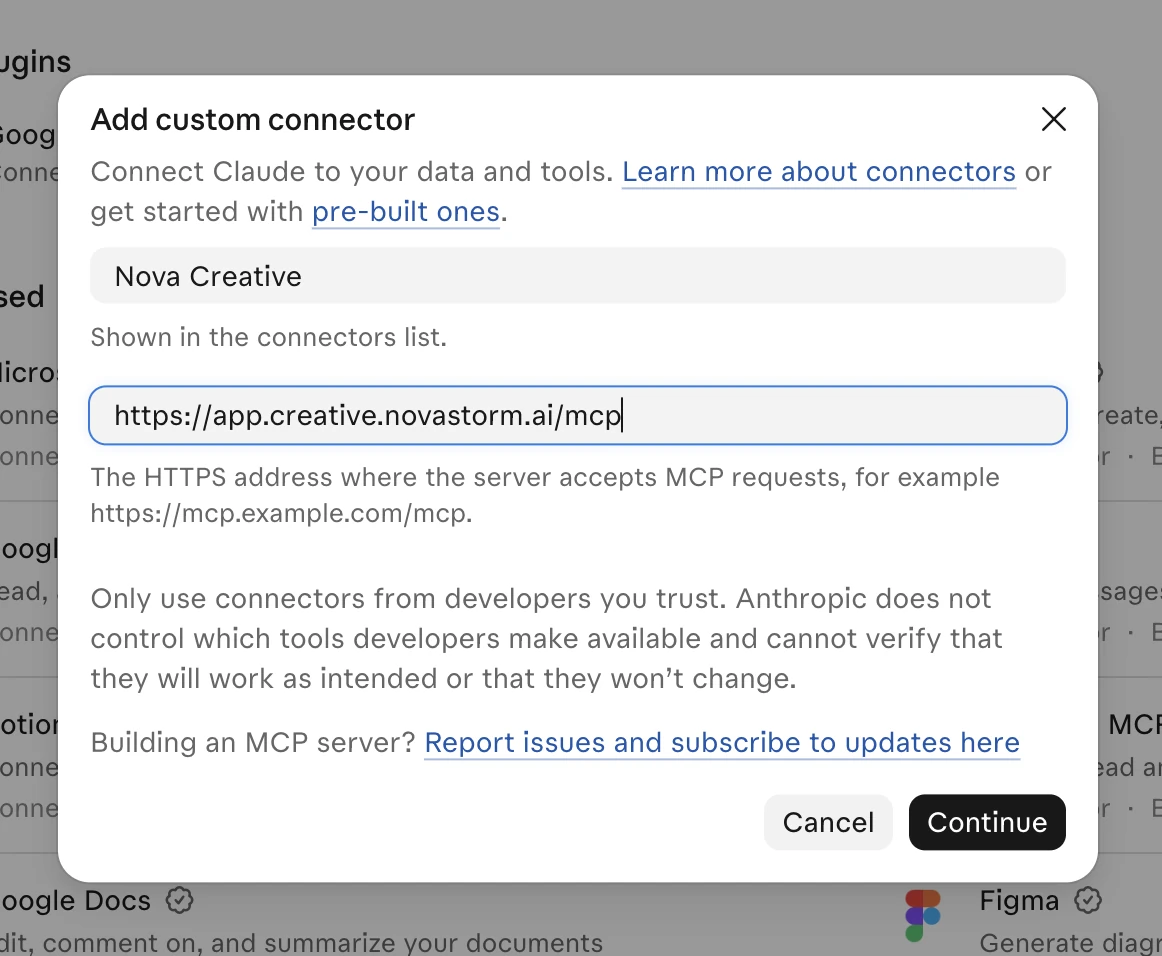
- Select Add, then Add custom connector.
- Enter a name, for example Nova Creative, and the server address:
https://app.creative.novastorm.ai/mcp - Select Continue. Claude marks one authentication option as Detected. For Nova Creative it was No sign-in, with a warning. We kept it, because Nova asks you to sign in before its tools run.
- Select Add. The connector appears in your list.
Send your first request
In a chat, open the + menu, choose Plugins and turn on Nova Creative. Then send this request with your own prompt in the brackets.
Use the Nova Creative connector. Create a workflow with one text block and one image generator. Put this prompt in the text block: [your prompt]. Show me the estimated credits and wait for my confirmation before you generate.
Claude asks for permission to use a tool. Choose Allow once if you want to approve each step.
Sign in to the service
- When you see "Authentication required to use this tool", select Connect.
- Sign in to Nova with Google, email or a token.
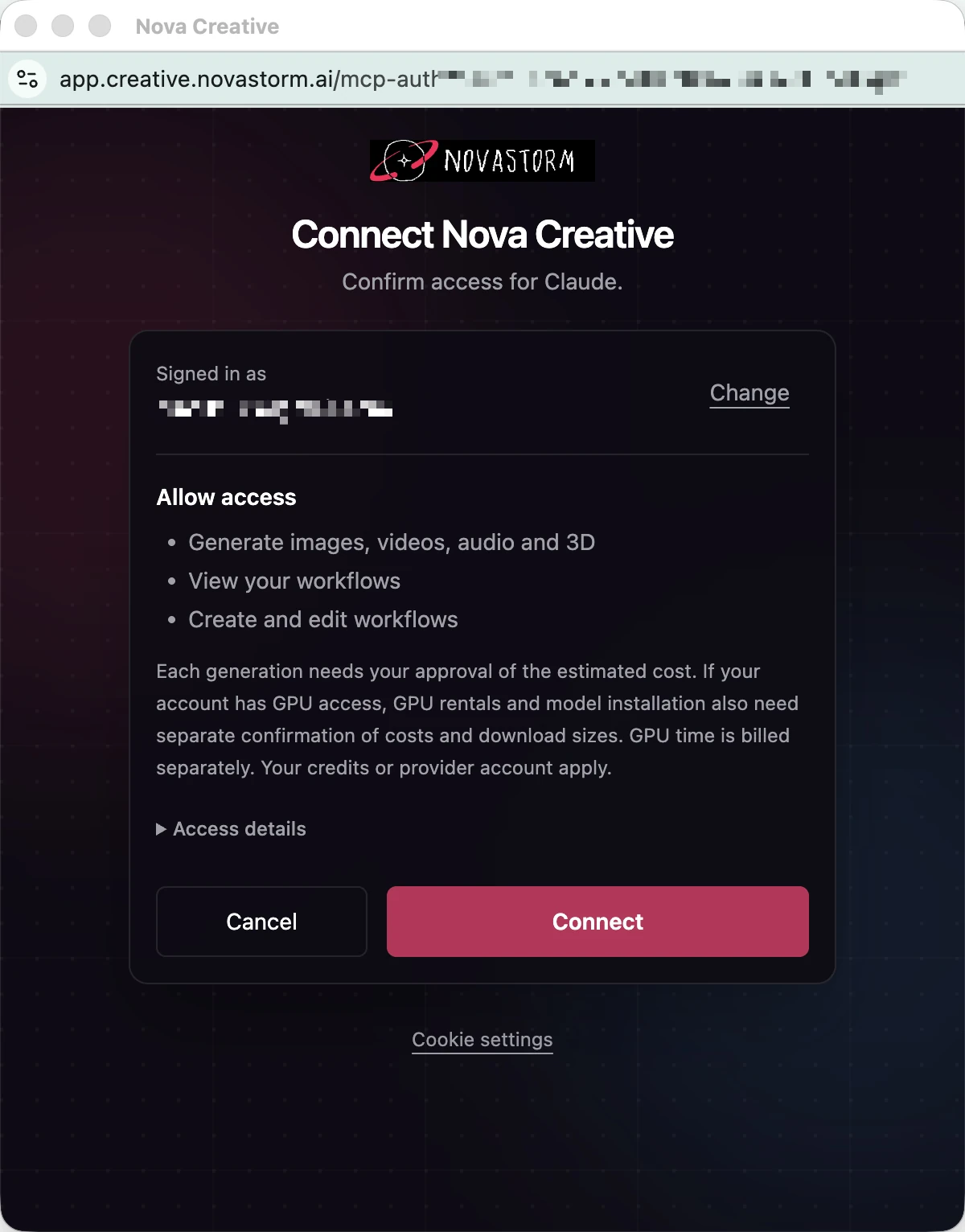
- Review the access request and select Connect. Nova lists three permissions: generate images, videos, audio and 3D; view your workflows; create and edit workflows.
See the price, then generate
Claude asked us for several approvals, including one to create the workflow and one to run the estimate. Then a card showed the price in credits. Nothing is charged at this point. The review is valid for five minutes; after that, use Refresh review or ask Claude to run the estimate again.
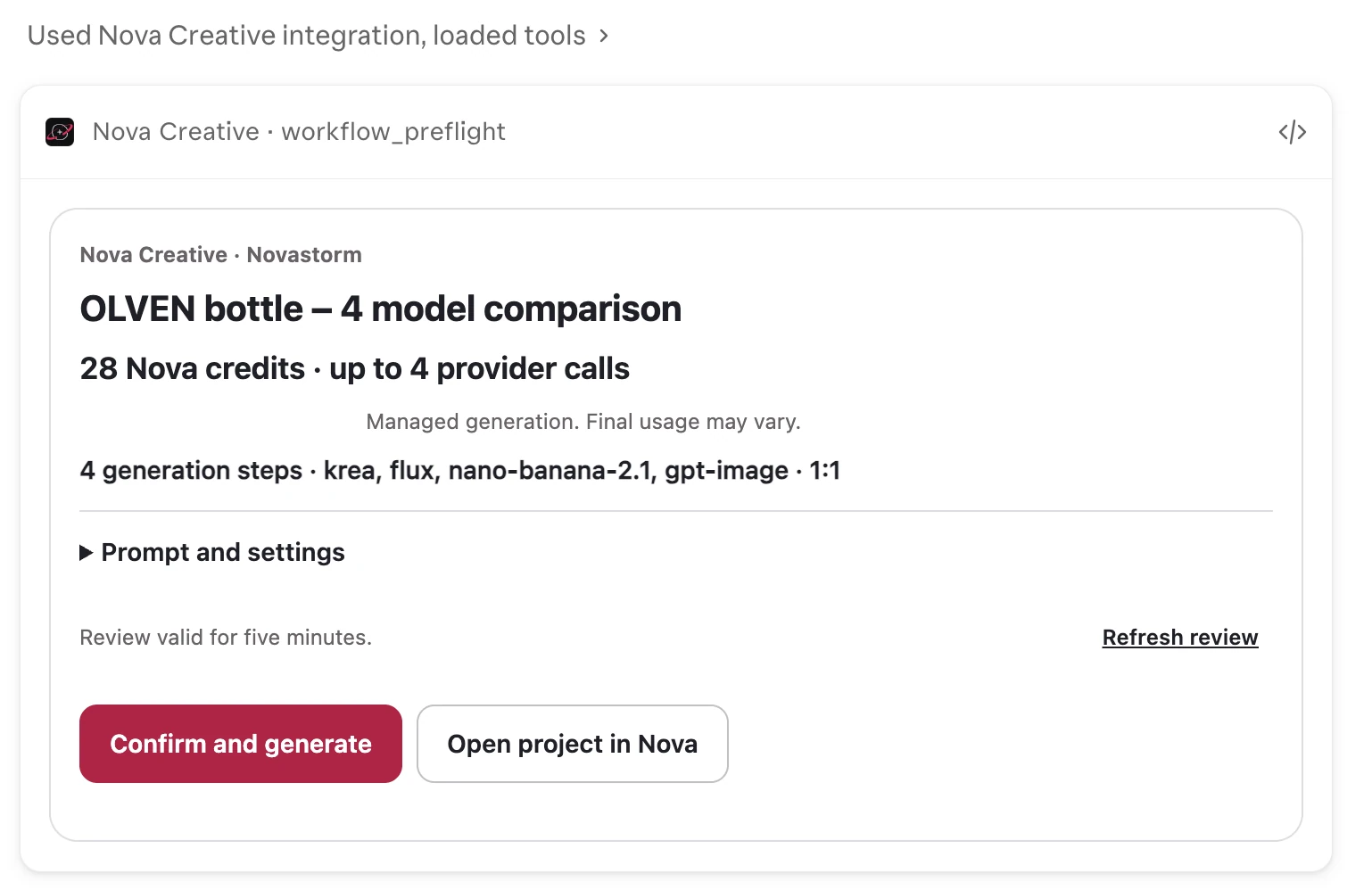
Select Confirm and generate on the card, or confirm in the chat. Do only one of the two, so that the same work does not start twice. The images appear in the card with a download button. Download links last fifteen minutes and can be refreshed without generating again. The workflow stays in your Nova account, so you can change the text and run it again.
Generation uses Nova credits, which you buy separately from your Claude plan. The standard rate is 100 credits for $1; the pricing page shows the current one.
Know what you are connecting
Nova Creative is not in Anthropic's connector directory. That directory does not accept connectors that generate images, video or audio through AI models, so you add image tools by address. Anthropic does not verify custom connectors. Add only servers you trust, read the access request, and disconnect a service you no longer use.
One brief, four models: what we got
We sent the OLVEN prompt to four image models from one Claude chat. We ran the same workflow twice at default settings, one image per model each time. In this small test a higher price did not buy a better score. Krea 2 Turbo at 2 cents and GPT Image 2 at 12 cents both passed every check.
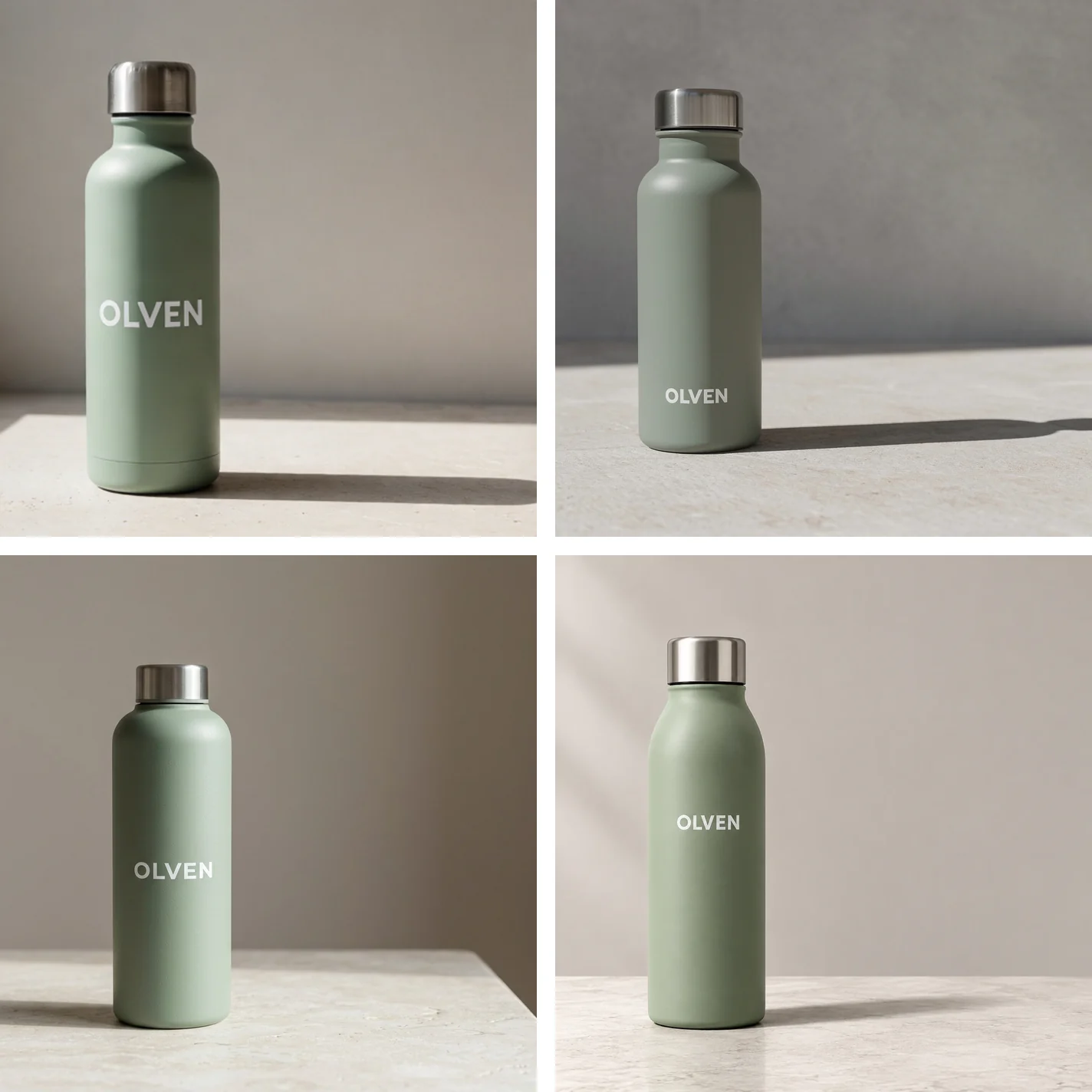
Every image got five yes-or-no checks:
- The label reads exactly OLVEN.
- There is one complete bottle.
- The center of the bottle is in the left third, and the right half is empty.
- The shadow falls to the right.
- There is nothing extra in the frame.
| Model | Credits per image | Image size, px | Label correct | Passed all five |
|---|---|---|---|---|
| Krea 2 Turbo | 2 ($0.02) | 512 x 512 | 2 of 2 | 2 of 2 |
| FLUX.2 Pro | 6 ($0.06) | 1024 x 1024 | 2 of 2 | 2 of 2 |
| Nano Banana 2.1 | 8 ($0.08) | 1024 x 1024 | 1 of 1 | 0 of 1 |
| GPT Image 2 | 12 ($0.12) | 1024 x 1024 | 2 of 2 | 2 of 2 |
Nova charged 56 credits ($0.56) for both rounds, the same as the estimate. One Nano Banana 2.1 image from the first round was not kept, so that row counts one.
What we noticed:
- The label was correct on all seven images, although Claude had warned that image models often garble lettering.
- No model clearly followed "short shadow". On six images the shadow runs well past the width of the bottle. On the Nano Banana 2.1 image it falls to the left, against the brief, and reaches the edge of the frame.
- FLUX.2 Pro printed the word small and near the base. In the second round its background was a cool, textured grey instead of a plain warm one.
- Krea 2 Turbo cost the least and passed every check, but its files are half as wide and half as high as the others. Check the size before you use such a file on a product page.
Two images per model cannot rank these models. Use the test as a template for your own product. Send one brief, ask the same yes-or-no questions about every image, and divide the credits by the images you can use. Our guide to comparing AI image models fairly explains how to widen the test.
Tested on November 23, 2026 with Claude Free in a browser, model Sonnet 5.5, effort Medium.
If it does not work
| What you see | Likely reason | What to do |
|---|---|---|
| Claude draws a flat illustration instead of a photo | No image model is connected, or it is off in this chat | Open +, then Plugins, turn it on and name it in your request |
| "Authentication required to use this tool" | You have not signed in to the service yet | Select Connect and sign in |
| The estimate can no longer be confirmed | The review is valid for five minutes | Use Refresh review or ask for a new estimate |
| The download link does not open | Nova links last fifteen minutes | Ask Claude to get the results again |
| Connect or Reconnect next to the connector | Sign-in was not finished or access was lost | Select it and sign in again |
| A second custom connector cannot be added | The Free plan allows one | Remove the first one or change the plan |
| No Add custom connector option | You are a member of a Team or Enterprise organization | Ask an Owner to add it |
The first two rows come from our own run. The others follow the documentation of Claude and Nova.
Check the image before you use it
- Compare the shape, proportions and color with a photo of the real product.
- Read every letter on the product at full size.
- Look at the edges, shadows and reflections.
- Confirm that you may use any reference photos you uploaded.
- Check whether the platform where you publish asks you to mark AI-made images.
For product images, follow the review steps in our AI product photography workflow.
Questions people ask
Does Claude AI have an image generator?
No, there is no built-in one. Claude's own visuals are HTML and SVG. A connected image model adds photos and illustrations, at that model's price.
Why can't Claude generate images?
Anthropic does not give a reason. Its documentation describes a model that reads and analyzes images, and it names no date for a change. Treat any prediction as a guess.
Can Claude generate images for free?
Diagrams and SVG graphics come from Claude itself, within the limits of your plan. A connected image model has its own price. The Free plan is enough to connect one: that is the plan we used for this test.
Can Claude Code generate images?
Not on its own. It can write SVG code, and it can work with MCP servers. With Nova Creative it reads and edits your saved workflows, and you run the generation in Nova. The steps are in our Claude Code setup guide.
Can Claude edit my photo?
Not on its own. It can describe the photo and write the instructions. A connected model with an editing mode can make the change.
Is Claude or ChatGPT better for images?
It depends on what you repeat. For a single picture, a chat tool with built-in image generation takes fewer steps. Claude with a connector is useful when you want to choose the image model, see the price first and run the same process again.
Can Claude generate videos?
Not on its own either. A connected service that makes video works the same way. Nova Creative makes video through the same connector.